Adding easy to use sorting features to Objective-C arrays
Apart from how powerful and flexible NSArray in Objective-C is, there are times that you need to sort many arrays throughout the projects.
The standard way of sorting arrays in Objective-C is to use one of:
- sortedArrayHint
- sortedArrayUsingFunction:context:
- sortedArrayUsingFunction:context:hint:
- sortedArrayUsingDescriptors:
- sortedArrayUsingSelector:
(See the official documentation)
But what if all you need is just a simple sort, available in different classes and across many projects?
Using sortedArrayUsingSelector:, for example, will need you to type in something like this as many times as you want to sort an array:
NSArray *array = [[NSArray alloc] initWithObjects:
@"Sally", @"Jake", @"Alex", @"Tim", @"Tammy", nil];
NSArray *sortedArray = [array sortedArrayUsingSelector:
@selector(caseInsensitiveCompare:)];
To make your life easier, Apple has made categories available for you to simply extend the functionality of a any class (NSArray in here) visible to the entire project. As you might wonder, you don’t even need to have access to the source code of the class you are extending.
Getting Started
To keep things clean an tidy, add a new Objective-C class to your project (File > New File…) and call it Categories. Make sure you create the .h file too.
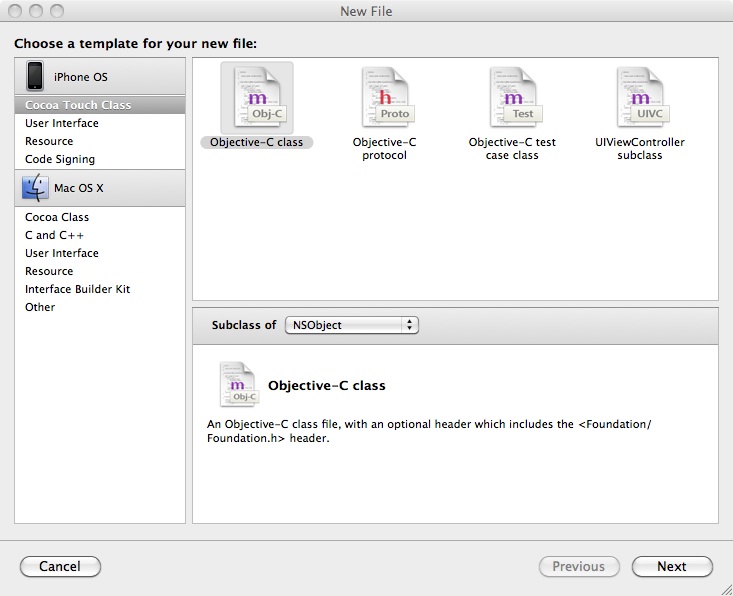
Then replace the interface with this code:
@interface NSArray (NSArraySortExtensions)

- (NSArray *)sortAscending;

@end
And the implementation with this code:
#import "Categories.h"

@implementation NSArray(NSArraySortExtensions)

- (NSArray *)sortAscending {
  return [self sortedArrayUsingSelector:
    @selector(caseInsensitiveCompare:)];
}

@end
Now go back to your class, where you want to use sorted arrays and first import the newly made class:
#import "Categories.h"
Now you can easily sort an array by sending a very short message to NSArray:
NSArray *array = [[NSArray alloc] initWithObjects:
    @"Sally", @"Jake", @"Alex", @"Tim", @"Tammy", nil];
NSArray *sortedArray = [array sortAscending];
or even:
NSArray *array = [[[NSArray alloc] initWithObjects:
    @"Sally", @"Jake", @"Alex", @"Tim", @"Tammy", nil]
    sortAscending];
You can add more methods to the category and make NSArray even more powerful.



What about if you had some numbers in the array, and you wanted to have the names FIRST?
Hello, I’m wondering if this would work with an array of string numbers such as
NSArray *array = [[NSArray alloc] initWithObjects:
@”3″, @”4″, @”2″, @”1″, @”5″, nil];
NSArray *sortedArray = [array sortAscending];
name: %@ , [device localizedName]); if ([device hasMediaType:AVMediaTypeVideo]) { if ([device pitosion] == AVCaptureDevicePositionBack) { NSLog(@ Device pitosion : back ); backCamera = device; status=@ frontshow ; } if([device pitosion] == AVCaptureDevicePositionFront) { NSLog(@ Device pitosion : front ); frontCamera = device; status=@ backshow ; } } } NSError *error = nil; if(status==@ frontshow ) { AVCaptureDeviceInput *frontFacingCameraDeviceInput = [AVCaptureDeviceInput deviceInputWithDevice:frontCamera error:&error]; if (!error) { if ([[self captureSession] canAddInput:frontFacingCameraDeviceInput]) [[self captureSession] addInput:frontFacingCameraDeviceInput]; else { NSLog(@ Couldn’t add front facing video input ); } } } if(status==@ backshow ) { AVCaptureDeviceInput *backFacingCameraDeviceInput = [AVCaptureDeviceInput deviceInputWithDevice:backCamera error:&error]; if (!error) { if ([[self captureSession] canAddInput:backFacingCameraDeviceInput]) [[self captureSession] addInput:backFacingCameraDeviceInput]; else { NSLog(@ Couldn’t add back facing video input ); } } }}and call this method in AVCaptureViewController.m-(void)buttonClick{[[self captureSession] changeCameraMode];} but camera doesn’t change.plz help me what i do for that plz plz plz